Collect client assets with one specific request: list each required item, its usable format, the person supplying it and the deadline. Separate files needed to begin from files that can follow later. Ask the client to send a completed transfer link and an inventory, then confirm what is ready and what is still missing.
“Please send everything over” sounds simple until a logo arrives as a screenshot, the copy is still awaiting approval and nobody knows who has the original photographs. A useful asset request removes those uncertainties before the work starts.
This guide gives you an intake checklist and messages you can adapt. It concerns preparing and checking the assets, rather than choosing a receiving service or managing the final delivery.
What should your client asset checklist contain?
List the actual inputs needed for the agreed job, with enough detail for the client to identify a usable file. Give each item an owner and a deadline.
Start from the work you are doing. A website designer might need approved copy, brand assets and selected photographs. A video editor might need camera footage, separate audio and a brief. Do not send every client the same long list of formats and ask them to work out what applies.
Here is an illustrative checklist for a small website project. The formats are example requirements to agree with your client, not universal rules.
- Logo: The existing vector artwork, if available, plus a viewing copy. Ready when: the client identifies the approved version.
- Page copy: One editable document with headings for each agreed page. Ready when: the named approver confirms the wording.
- Photographs: The selected full size image files, grouped by intended use. Ready when: filenames match the supplied placement notes.
- Brand guidance: The current PDF or written colours and typography notes. Ready when: the client confirms which guidance is current.
- Contact details: The exact public details to display. Ready when: the client confirms accuracy.
Add an owner, due date and status to each row in your working checklist. Useful statuses are Requested, Received, Needs clarification and Ready. Receiving a file is not the same as confirming that it can be used.
Which assets must arrive before work begins?
Identify the files that determine the first meaningful stage of work and agree which remaining items can arrive later. Make the dependency explicit.
For example, a designer might need the approved logo and page structure before layout work, while one replacement photograph can follow before final review. That is a project decision, not a reason to assume all missing assets are harmless.
For each missing item, state what it blocks. “The homepage layout needs the approved headline” is easier to act on than “We are still waiting for content”. If you can work with a placeholder, agree that it is temporary and record who will replace it and when.
What asset request email can you send?
Send one message with the required items, ownership, delivery date and a clear way to report anything unavailable. Replace the example requirements before using this template.
Subject: Files needed to start [project name]
Hello [name],
To begin [first stage] on [date], please send the following by [date, time and time zone]:
1. The approved logo artwork and a viewing copy.
2. One editable document containing the approved copy for [pages].
3. The selected original image files, with a note saying where each should be used.
4. The current brand guidance and confirmed public contact details.Please nominate one person to confirm which versions are approved. If an item is not available, reply with its owner and expected date rather than leaving it out without a note.
Put the files in clearly named groups. Send me the completed HeftySend transfer link, the total size and a short contents list. Please use the agreed sending day so I can collect the files before the link expires.
I will check the delivery and reply with either confirmation that we can start or one consolidated list of outstanding items. Please keep your original files.
If the client is unfamiliar with downloads and links, adapt our plain English file delivery message. Keep the request short enough that the client can see the required action without searching through several conversations.
How should the client organise the asset package?
Use a recognisable project folder with a few labelled groups and a contents note. Keep approved assets separate from references and superseded drafts.
ProjectName_Intake/
  Brand/
  ApprovedCopy/
  SelectedImages/
  References/
  Contents.txt
This is an example structure. The contents note can state who supplied each group, how many files it contains and any known omissions. A reference image should be labelled as a reference rather than mixed into the assets intended for publication.
A ZIP can keep a prepared folder together when that suits both parties. On a Mac, Apple’s ZIP instructions explain using Compress from the shortcut menu and opening the resulting archive with a double click. Allow space for both the archive and extracted contents.
MacMost’s video below demonstrates creating and opening ZIP files on a Mac. It is useful if the client needs help packaging the agreed folder; it is not a demonstration of a HeftySend transfer.
How can the client send the prepared assets?
The client can upload the prepared files to HeftySend and send you the completed transfer link. This is an ordinary transfer workflow, not a claim that HeftySend creates an asset request portal or tracks your checklist automatically.
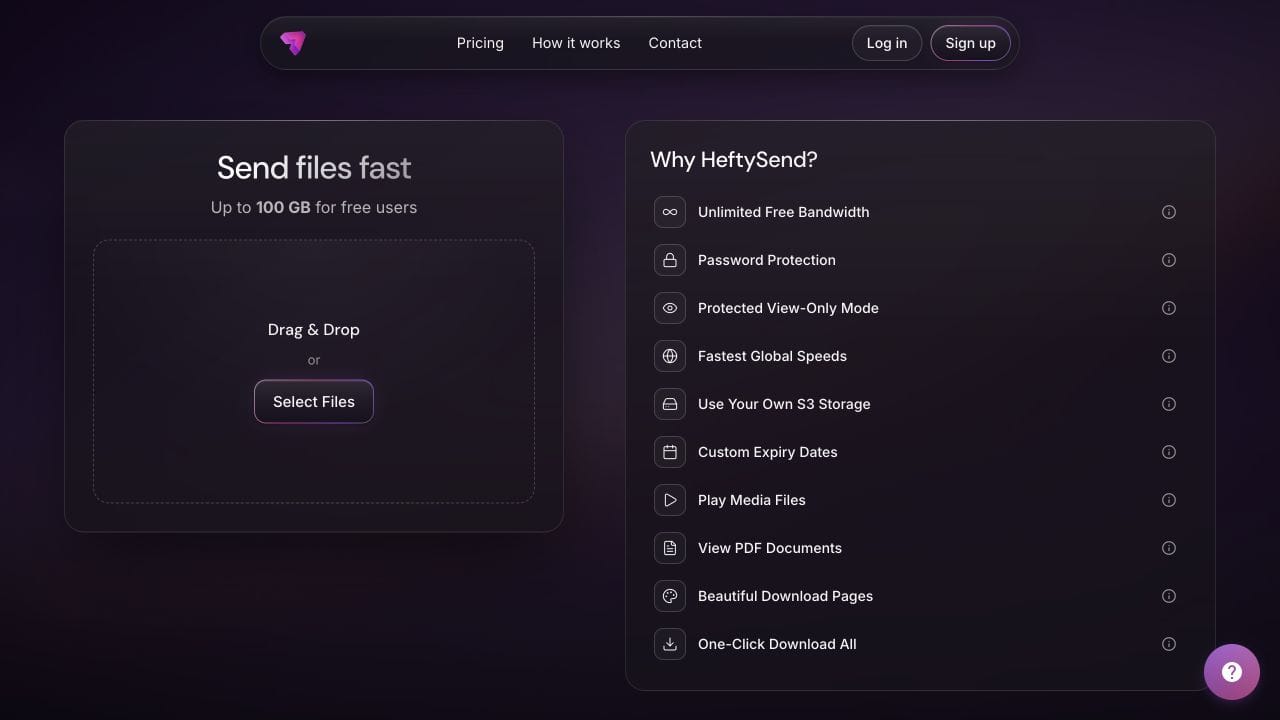
HeftySend Free currently allows up to 100 GB per transfer with three days of availability and no account needed for a basic send. Recipients can download without an account. Agree a sending day when you can collect the files, and measure the complete package rather than estimating from file count.
Supported previews help you recognise images, videos, audio and PDFs. Download the actual working assets before treating the package as collected. HeftySend’s recipient instructions describe the download page. If the client needs different capacity or availability, check the current HeftySend plans.
HeftySend does not charge for bandwidth usage. If you connect your own storage, the provider’s storage, request and delivery charges remain separate.
What should you check when the files arrive?
Compare the downloaded package with the checklist, check representative files in the intended software and resolve unclear approval status before starting dependent work.
- Record the transfer link, sender and collection deadline.
- Compare the contents note with the requested items and file counts.
- Open the files needed for the first stage. A familiar extension alone does not confirm that a file is usable.
- Confirm which copy and artwork are approved, and identify references or placeholders.
- Record each unresolved item with an owner and next action.
- Tell the client what is ready and what still affects the start date.
Do not silently replace missing originals with screenshots or small previews. Ask for the required source file, or agree the limitations of an alternative. Keep the received package separate from your working copies so you can identify what the client actually supplied.
How do you chase missing assets without another vague reminder?
Send one consolidated list that names each missing item, why it is needed and who should supply it. Avoid asking the client to resend files you already have.
Thanks, I have received the logo, brand guide and six selected photographs. The following items still need attention:
1. About page copy: please confirm the approved wording and owner.
2. Product photograph [filename]: the supplied copy is a screenshot; please send the original image file.
3. Public phone number: please confirm the exact number to display.These items affect [specific stage]. Please send the additions by [date] or let me know their expected availability so we can agree the next step.
Ask the client to label the next transfer as an addition or replacement and identify the affected item. If timing changes, discuss the revised work sequence explicitly. A reminder cannot guarantee that another person will deliver on time.
How can you keep the eventual handover recognisable?
Use the same project name and clear version descriptions when returning work to the client. Paid HeftySend custom download pages can provide a consistent presentation for that outgoing delivery.

Customisation can make the handover familiar, but your asset checklist remains a separate project record. Use HeftySend custom download pages for presentation and your agreed checklist for ownership, readiness and outstanding decisions.
Frequently asked questions
Should I request every asset the client owns?
No. Request the assets needed for the agreed scope and explain their purpose. A smaller, specific request is easier to reconcile than an unexplained archive of everything.
Can several people contribute files?
Yes. Give each contributor named items and deadlines, then nominate one person to resolve approval questions. Record each delivery against the same checklist.
What if the client does not know the file format?
Describe the source you need, such as the logo artwork from their designer, and ask them to tell you what they have. Do not ask them to rename an extension to make a file appear suitable.
Should account passwords go in the asset folder?
No. Keep account access separate from project files and use the service’s appropriate invitation or access process. A request for brand assets is not a request for someone’s login credentials.
Does receiving an image confirm permission to publish it?
No. Ask the client to confirm the intended use and any restrictions as part of the project approval process. Do not treat a successful download as that confirmation.
When can I mark intake complete?
When the required items are usable, the approved versions are clear and any exceptions have an agreed owner and plan. Tell the client which stage is ready to begin rather than relying on the word “received”.
Give the client a specific request, collect the prepared package and respond with a clear readiness check. HeftySend handles the transfer link while your checklist keeps the project requirements visible.
Product details checked on 24 October 2026. Templates and folder names are illustrative. No test transfer was performed for this guide.