Use one transfer when the same recipient needs the complete delivery together. Use smaller transfers when people need different files, some files are urgent, or collecting manageable groups is easier. Splitting the same data does not make your connection faster or reduce the space needed to keep all the files.
The best package is the one your recipient can collect and check without guessing. Before dividing a large folder, ask whether the problem is the number of links, the download method, the connection or the destination disk.
When is one large transfer the simpler choice?
Keep the delivery together when one person needs everything, the files belong to one agreed version and the total fits your transfer allowance. One link gives you fewer messages, expiry dates and receipt checks to manage.
One transfer does not have to mean one enormous ZIP. You can include several files behind the same link and let the recipient choose individual downloads. This is useful when someone wants to inspect supported media before collecting the complete set.
HeftySend Free currently allows up to 100 GB per transfer with three day expiry. A delivery below that allowance does not need splitting simply because it is too large for an email attachment. Check the current HeftySend plans and agree when the recipient can collect it.
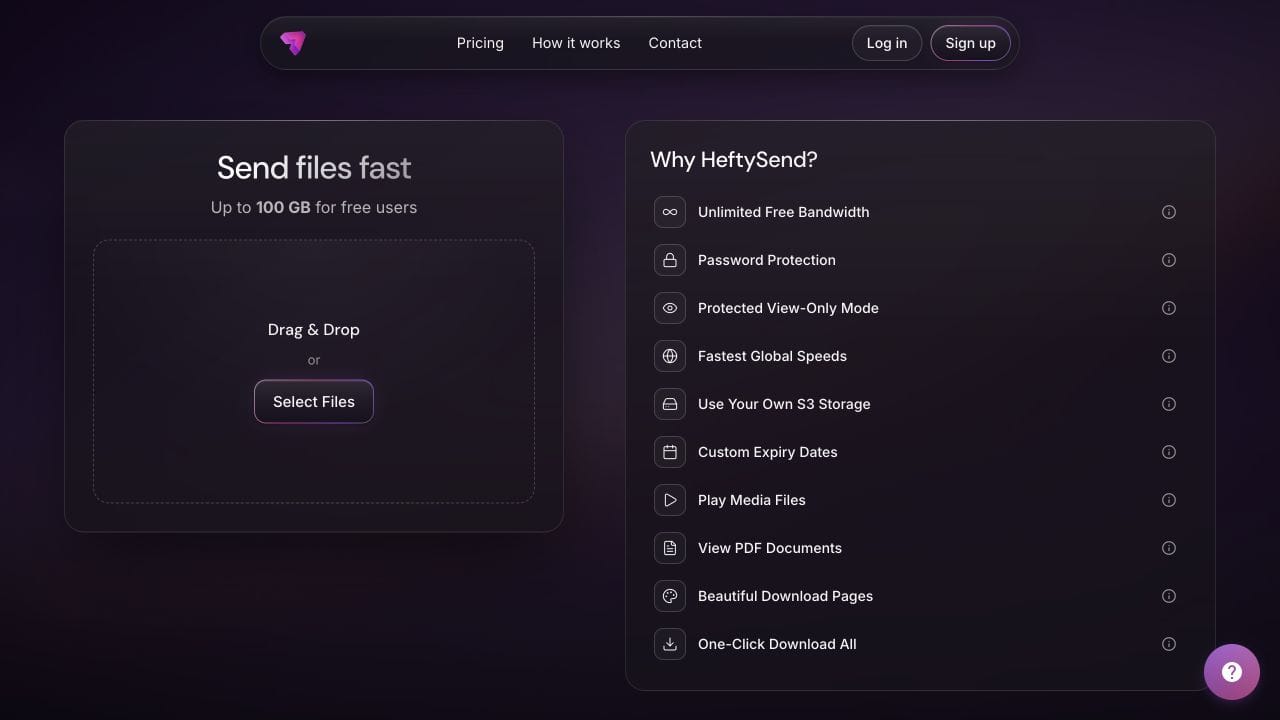
HeftySend does not charge for bandwidth usage. Paid plans add custom download pages for your client presentation. If you connect your own storage, its storage, request and delivery charges remain separate.
When are smaller transfers worth the extra links?
Split by a useful delivery boundary, such as recipient, purpose or deadline. Avoid arbitrary chunks that leave the recipient unsure what belongs together.
- Different recipients: send each person the files they actually need, rather than sharing unrelated client material in one package.
- Different deadlines: deliver the approved files needed today separately from material that will be ready later.
- Manageable collection sessions: agree smaller complete groups if the recipient cannot leave a device connected for long.
- A replacement: label the changed files clearly instead of sending the entire project again without explanation.
Keep dependencies together. A project file without its required assets may be small but unusable. Our folder delivery checklist covers package completeness; this decision is about how many deliveries the recipient should manage.
Will splitting files fix an unreliable connection?
Smaller groups can make it easier to identify what has finished and retry what remains, but they do not repair a weak connection. A resumable download method may be more useful than creating several new links.
HeftySend’s free desktop app for Mac and Windows lets recipients paste a transfer link and download its files to a chosen folder, with resume and checksum verification. Recipients do not need an account. That offers a way to collect a large delivery without asking the sender to divide it purely for downloading.
If you do choose separate batches, complete and record each one before treating the whole job as delivered. Do not assume opening more simultaneous uploads will increase the total capacity of your internet connection.
For example, 24 GB sent as three 8 GB transfers is still 24 GB before any packaging overhead or retries. At a sustained 20 Mbps upload speed, either arrangement has a theoretical minimum upload time of 160 minutes. That calculation uses decimal gigabytes and eight bits per byte. It excludes overhead, interruptions and the recipient’s subsequent download; it is not a speed test.
Does the Download All limit mean I need smaller transfers?
Only if that is the collection method you and the recipient choose. HeftySend’s browser generated Download All ZIP is capped at 10 GB total transfer size, which is separate from the free 100 GB transfer allowance.
For a transfer above 10 GB, recipients can use individual file downloads. The desktop app is another option for downloading the files together without relying on that browser ZIP. The Download All tutorial explains the browser cap.
If the recipient specifically wants browser ZIP downloads, smaller transfers within the cap can be practical. Leave room for the actual selected files and any notes rather than relying on a rounded folder size. An archive you create before uploading is a supplied file, not the same thing as the generated Download All ZIP.
How would you divide a 24 GB delivery?
Choose the recipient’s preferred collection method first. This illustrative example assumes three independent sets of finished images, each 8 GB, called Interiors, Exteriors and Details. It is not a customer delivery or a tested transfer.
- One 24 GB transfer: give the recipient one link and a contents note listing the three sets. Agree individual downloads or the desktop app, since the total exceeds the browser ZIP cap.
- Three 8 GB transfers: send one link per set if separate browser ZIP downloads suit the recipient. Label them “1 of 3: Interiors”, “2 of 3: Exteriors” and “3 of 3: Details”. Include each link’s actual expiry.
- Only Interiors is urgent: send that complete set first. State that Exteriors and Details will follow, rather than calling the first link the complete delivery.
Keep one delivery note listing the expected sets, file counts, sizes and links. Ask the recipient to confirm each set by name. If something changes later, say which earlier file or set it replaces.

Will smaller transfers solve a storage shortage?
Not if the recipient needs to keep every file on the same disk. Three 8 GB sets still require space for 24 GB of files. Collecting one set at a time only helps if there is an agreed place to move and retain completed sets.
Archives may require additional working space while the downloaded ZIP and its extracted contents coexist. Apple’s ZIP guidance specifically advises checking space for the expanded files. Do not delete the only complete copy just to make room for the next batch.
If you decide to package each group as a ZIP, MacMost’s demonstration below shows creation and extraction on a Mac. Watch it for the packaging steps, not as evidence that ZIP compression will substantially shrink your delivery or improve HeftySend speeds.
Watch MacMost’s Mac ZIP demonstration on YouTube.
Frequently asked questions
Can I split a single large video just by sending more links?
No. Separate links do not divide the file itself. Splitting a video or archive requires an appropriate tool and a clear way for the recipient to use or reconstruct it. Prefer sending the intact file when that meets the job’s requirements and allowance.
Should each batch contain the same instructions?
Include enough context to identify each batch, plus one master delivery note covering the whole job. Avoid conflicting copies of the instructions. State the expected total number of batches.
Will all the links expire together?
Do not assume so. Check and communicate the actual expiry for each transfer. Uploading a later batch does not extend an earlier link.
Can the recipient collect only selected files?
Yes, on a normal downloadable HeftySend transfer they can use individual file downloads. If they only need part of the delivery, agree that scope before asking for confirmation of the whole package.
Does splitting into batches change image quality?
Grouping unchanged files into different transfers does not re export their contents. Creating smaller image or video exports is a separate operation that can change quality. Keep the agreed originals when those are required.
What should I do when one batch is missing?
Compare the delivery note with the saved files and identify the missing set precisely. Check its link and expiry before sending a replacement. Our recipient download troubleshooting guide helps distinguish a link problem from a failed local download.
Choose the fewest links that still make the handover easy to collect, check and use. HeftySend supports a single clear delivery with useful previews, while smaller named transfers remain an option when the job genuinely needs them.
Product details checked on 27 October 2026. Sizes and timing are illustrative. No test transfer was performed.